Email to webhook: the complete guide to receiving email as JSON
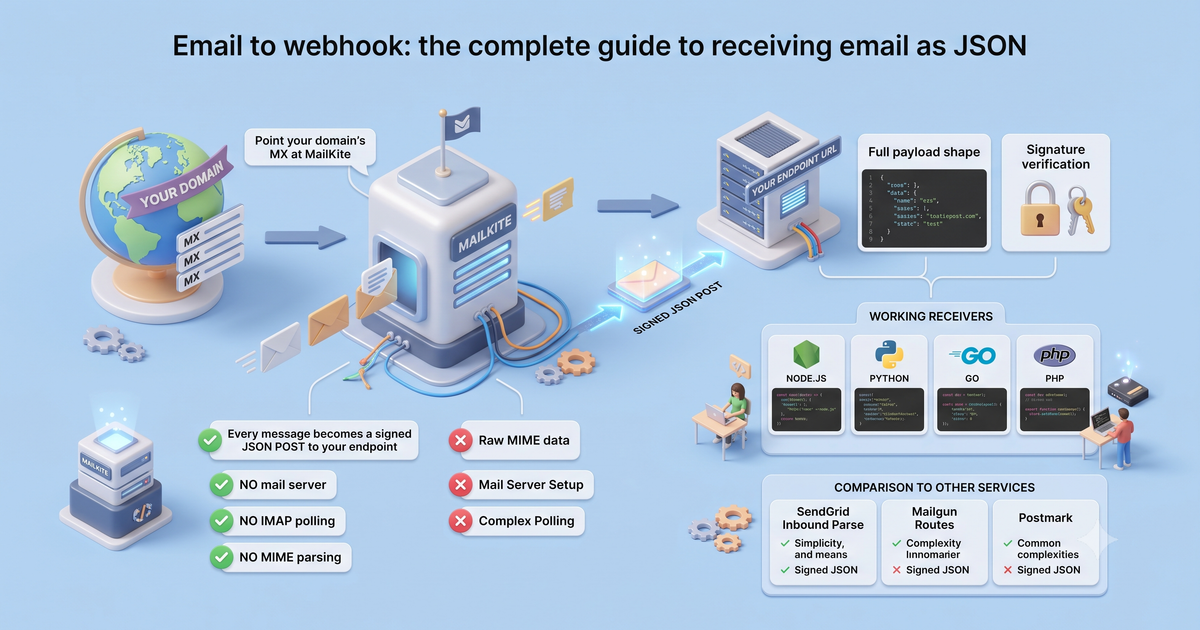
Point your domain's MX at MailKite and every message becomes a signed JSON POST to your endpoint — no mail server, no IMAP polling, no MIME parsing. The full payload shape, signature verification, working receivers in Node, Python, Go, and PHP, and how it compares to SendGrid Inbound Parse, Mailgun Routes, and Postmark.
Receiving email in an app is supposed to be the hard direction. Sending is a POST; receiving traditionally means running an MX host, speaking SMTP, parsing MIME, decoding transfer encodings, and reassembling multipart bodies before you ever see the text a human typed. Email-to-webhook collapses all of that into one thing your app already knows how to handle: an HTTP request with a JSON body.
Here is the whole idea in one sentence: point your domain’s MX records at MailKite, and every message sent to any address on that domain is parsed and POSTed to your endpoint as structured JSON — headers, text, HTML, and attachments already broken out, signed so you can trust it, retried if your endpoint is down. No mail server to run, no IMAP connection to babysit, no mailparse in your dependency tree.
This is the complete reference for that pattern: how it works, the exact payload you receive, verifying the signature, working receivers in four languages, and an honest comparison to the incumbents. If you want a single-language walkthrough instead, the Node tutorial and the Python one go slower; this page is the map they hang off.
How it works, end to end
Three moving parts:
- DNS. You add the MX record MailKite generates for your domain. When it verifies, mail for
*@yourdomain.comstarts flowing to the edge. (Sending from the same domain needs SPF + DKIM, which MailKite also manages — one domain, both directions.) - The edge. MailKite’s MX host accepts the SMTP connection, checks SPF/DKIM, and parses the raw message into a clean object: decoded text and HTML, split headers, and attachments pulled out of their multipart wrapping.
- The webhook. That object is signed and POSTed to the endpoint you registered. Your endpoint verifies the signature, does its work, and returns
2xx. If it returns anything else — or times out — MailKite retries on a backoff schedule and alerts you, so a deploy blip never silently drops mail.
The payload you receive
Every inbound message arrives as the same shape. Here is a representative email.received event:
{
  "type": "email.received",
  "id": "msg_2Hk9QpVn4tLd",
  "threadId": "<9920-outbound@myapp.ai>",
  "from": { "address": "ada@example.com", "name": "Ada Lovelace" },
  "to": [{ "address": "support@myapp.ai", "name": "Support" }],
  "subject": "Re: your invoice",
  "text": "Thanks — can you resend the PDF?\n\nAda",
  "html": "<p>Thanks — can you resend the PDF?</p><p>Ada</p>",
  "receivedAt": 1785247929000,
  "receivedAtIso": "2026-07-04T14:12:09Z",
  "auth": { "spf": "pass", "dkim": "pass", "dmarc": "pass", "spam": "ham" },
  "attachments": [
    {
      "filename": "signature.png",
      "contentType": "image/png",
      "size": 20481,
      "url": "https://api.mailkite.dev/att/2Hk9QpVn4tLd/0?exp=1754265600&sig=…"
    }
  ]
}
These are the exact field names and types from the published JSON schema — validate against it in CI if you like. A few things worth calling out because they save you real work:
textandhtmlare already decoded. No quoted-printable, no base64 body, no charset guessing.idandthreadIdare what you thread on.idis the stable message id — identical across retries, so use it as your idempotency key. When a reply comes back, itsthreadIdroots back to the same conversation; pass thatthreadIdasinReplyToon your nextsend()to reply in-thread. That is the whole basis of reply-by-email.receivedAt(epoch ms) andreceivedAtIso(RFC 3339) describe the moment the message arrived at the edge — the same values on every retry or replay, never the moment of the POST.authcarries SPF / DKIM / DMARC / spam verdicts computed at the receiving edge, where the connecting IP and SMTP envelope are still visible. Any field isnullwhen that check didn’t run — treatnullas “unknown,” never “pass,” and checkauthbefore trusting thefromname.- Attachments come as a signed download
urlby default (no credentials needed, valid 7 days). On zero-retention or at-rest-encrypted domains the bytes are inlined as base64contentinstead. It’s one or the other per attachment — never both.
Verify the signature — before anything else
The webhook is a public URL. Anyone who finds it can POST to it, so the first thing your handler does, every time, is confirm the request actually came from MailKite. Each POST carries an x-mailkite-signature header: an HMAC of the raw request body with your webhook secret. Recompute it and compare in constant time.
Two rules that trip people up:
- You need the raw bytes. If your framework parses JSON before you can read the body, the bytes you hash won’t match the bytes MailKite hashed. Reach for the raw-body option (
express.raw, Flask’srequest.get_data(),io.ReadAll,php://input). - Honor the replay window. The signature covers a timestamp; reject anything older than a few minutes so a captured request can’t be re-fired later.
The SDKs wrap all of that — recompute, constant-time compare, timestamp check — in one call. The deep dive on how the HMAC is constructed (and how to verify it by hand if you’re not on an SDK) is in Verifying inbound webhooks with HMAC.
Working receivers, four languages
Each of these is a complete, runnable endpoint. Same three steps every time: read the raw body, verify, handle.
Node (Express)
import express from "express";
import { MailKite } from "mailkite";

const app = express();
const SECRET = process.env.MAILKITE_WEBHOOK_SECRET;

// raw body — do NOT let express.json() touch it first
app.use("/inbound", express.raw({ type: "application/json" }));

app.post("/inbound", (req, res) => {
  if (!MailKite.verifyWebhook(req.headers["x-mailkite-signature"], req.body, SECRET)) {
    return res.sendStatus(401);
  }
  res.sendStatus(200); // ack fast

  const email = JSON.parse(req.body);
  if (email.type !== "email.received") return;
  console.log(`${email.from.address}: ${email.subject}`);
});

app.listen(3000);
Python (Flask)
import os
from flask import Flask, request, abort
from mailkite import verify_webhook

app = Flask(__name__)
SECRET = os.environ["MAILKITE_WEBHOOK_SECRET"]

@app.post("/inbound")
def inbound():
    raw = request.get_data()  # raw bytes, before JSON parsing
    sig = request.headers.get("X-MailKite-Signature", "")
    if not verify_webhook(sig, raw, SECRET):
        abort(401)

    email = request.get_json()
    if email["type"] == "email.received":
        print(f"{email['from']['address']}: {email['subject']}")
    return "", 200
Go (net/http)
func inbound(w http.ResponseWriter, r *http.Request) {
    raw, _ := io.ReadAll(r.Body)
    sig := r.Header.Get("X-MailKite-Signature")
    if !mailkite.VerifyWebhook(sig, string(raw), secret) {
        http.Error(w, "bad signature", http.StatusUnauthorized)
        return
    }
    w.WriteHeader(http.StatusOK) // ack fast

    // Define the fields you care about — the SDK ships no inbound-event struct.
    type addr struct{ Address string `json:"address"` }
    var email struct {
        Type    string `json:"type"`
        Subject string `json:"subject"`
        From    addr   `json:"from"`
    }
    json.Unmarshal(raw, &email)
    if email.Type == "email.received" {
        log.Printf("%s: %s", email.From.Address, email.Subject)
    }
}
PHP
<?php
require 'vendor/autoload.php'; // composer require mailkite/mailkite
use MailKite\Client;

$mk = new Client(getenv('MAILKITE_API_KEY') ?: 'unused-for-verify'); // verifyWebhook is local; no key needed

$raw = file_get_contents('php://input'); // raw body
$sig = $_SERVER['HTTP_X_MAILKITE_SIGNATURE'] ?? '';

if (!$mk->verifyWebhook($sig, $raw, getenv('MAILKITE_WEBHOOK_SECRET'))) {
    http_response_code(401);
    exit;
}
http_response_code(200); // ack fast

$email = json_decode($raw, true);
if ($email['type'] === 'email.received') {
    error_log("{$email['from']['address']}: {$email['subject']}");
}
Ruby and Java receivers follow the same shape — the SDKs all expose the same verifyWebhook and the same field names, so the payload you destructure is identical across every language.
How it compares
Inbound-as-webhook isn’t unique to MailKite. What differs is whether it’s a first-class primitive or a feature bolted onto a sending product.
| Inbound approach | Notes | |
|---|---|---|
| SendGrid Inbound Parse | MX → multipart form POST | The most established; payload is multipart/form-data, not JSON, so you parse fields yourself. Send-first product. |
| Mailgun Routes | Rules → forward/store/POST | Powerful routing DSL, but inbound is configured separately from sending and docs skew toward the sending API. |
| Brevo / Postmark inbound | MX → JSON POST | Clean JSON (Postmark especially), solid — again a companion to the send product. |
| inbound.new / newer entrants | MX → JSON POST | Inbound-first and pleasant, but small; fewer languages, thinner surrounding platform. |
| MailKite | MX → signed JSON POST | Inbound is a first-class primitive, unlimited domains free, and the same verified domain sends too — so a reply goes back out without a second vendor. |
None of these are bad. The reason to reach for MailKite specifically is when receiving isn’t an afterthought — when your app or your agent needs to hold a two-way conversation on a domain you control, and you’d rather not run one vendor for outbound and glue a second one on for inbound.
Where to go next
- Single-language walkthroughs: parse inbound email to JSON in Node and receive email in Python.
- The security details: verifying inbound webhooks with HMAC.
- Threading replies into a conversation: reply by email in your app.
- Coming from a competitor: the SendGrid Inbound Parse alternative.
- The full picture — send, receive, and agent inboxes on one domain: programmable email.
Point an MX record, register a URL, and email becomes just another JSON request. Start free — unlimited domains and mailboxes, 3,000 emails a month, 100 emails/day.