Reply-by-email: handling inbound replies in your app
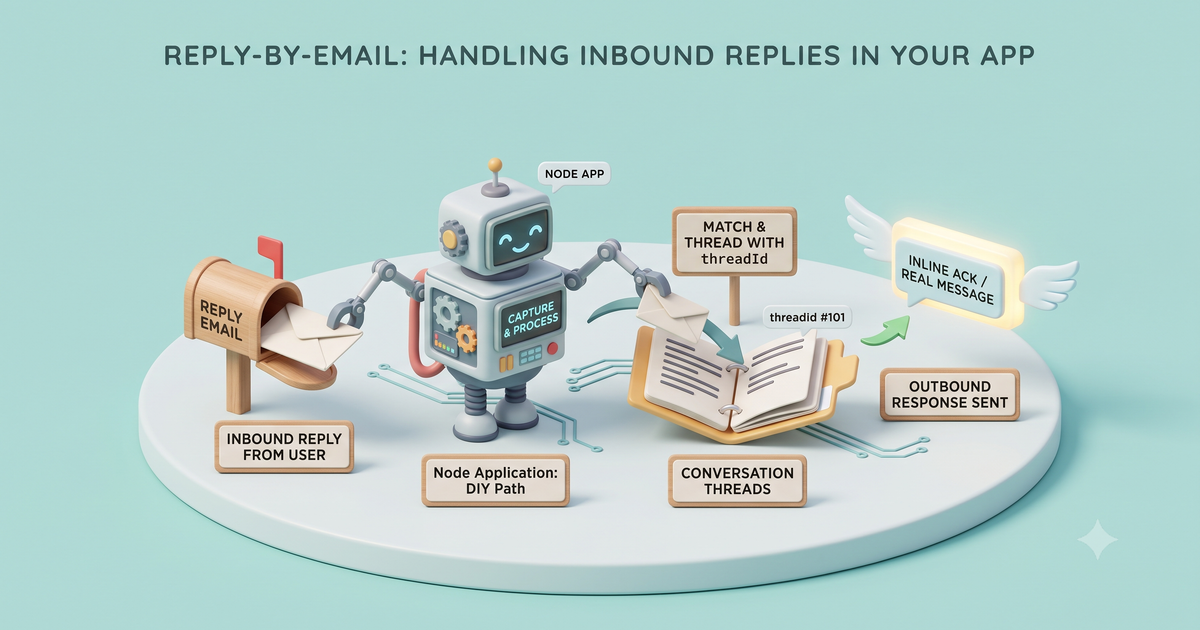
When users reply to your notification emails, capture the reply, thread it to the right conversation with threadId, and respond: either an inline ack or a real outbound message. Working Node code, honest DIY path.
This is for a developer wiring reply handling into an app for the first time, whatever email provider you use. Reply handling lives entirely on the inbound side of email, the hard direction, and the whole feature hinges on a single identifier surviving a round-trip: when you send the notification you tag it with a Message-ID, and when the user replies from their own inbox their mail client quotes that id back in the reply’s headers. That returning id is what lets you drop the reply into the right conversation instead of guessing from a subject line. Here’s that round-trip, end to end:
Here’s the whole capture path as a complete, runnable Node server:
// reply-handler.mjs — a complete reply-by-email webhook. Runs as pasted on Node 18+ (npm i express mailkite).
import express from "express";
import { MailKite } from "mailkite";

const SECRET = process.env.MAILKITE_WEBHOOK_SECRET ?? "whsec_demo_secret";
const threads = new Map(); // stand-in for your database, keyed by threadId

const app = express();
app.use("/hooks/mailkite", express.raw({ type: "application/json" }));

app.post("/hooks/mailkite", (req, res) => {
  // Verify first: header is t=<ms>,v1=<hmac-sha256 hex over `${t}.${rawBody}`>. One call does the
  // parse, the replay-window check, and the constant-time compare.
  if (!MailKite.verifyWebhook(req.headers["x-mailkite-signature"], req.body, SECRET)) {
    return res.sendStatus(401);
  }

  const event = JSON.parse(req.body);
  if (event.type === "email.received") {
    // From: is forgeable and a reply address is public, so trust the auth block before acting.
    if (event.auth?.spf !== "pass" || event.auth?.dmarc !== "pass") {
      return res.json(MailKite.replyOk()); // untrusted: drop it, but still ack the delivery
    }
    // Thread on threadId, never subject. Append only the new text.
    const thread = threads.get(event.threadId) ?? [];
    thread.push({ from: event.from.address, body: stripQuoted(event.text ?? "") });
    threads.set(event.threadId, thread);
  }

  return res.json(MailKite.replyOk()); // ack inline: MailKite records this as the delivery
});

function stripQuoted(text) {
  const out = [];
  for (const line of text.split("\n")) {
    const t = line.trim();
    if (/^On .+ wrote:$/.test(t) || /^-{2,}\s*Original Message\s*-{2,}/i.test(t) || t.startsWith(">")) break;
    out.push(line);
  }
  return out.join("\n").trim();
}

app.listen(3000, () => console.log("reply handler on :3000/hooks/mailkite"));
That’s capture, threading, quote-stripping, and an acknowledgement in one file. The rest of this post unpacks the three moving parts, then shows how to send a real reply back so the thread stays coherent in both directions. (Prefer not to take a dependency? MailKite.verifyWebhook is a thin HMAC helper you can hand-roll: the header format is above, and the DIY section sketches the rest.)
The one rule that makes threading work
When you send a notification, send it from a reply-friendly address on a domain you receive on: replies@myapp.ai, or a per-conversation address like ticket+8213@myapp.ai. Store the outgoing message’s Message-ID on your record. When the user hits reply, their client sets In-Reply-To and References back to that Message-ID, the reply lands at your webhook, and those headers get resolved into one stable threadId. Match on it, and the reply drops into the right conversation.
Here’s what that resolved reply looks like when it hits your webhook:
{
  "id": "msg_2Hk9…",
  "type": "email.received",
  "from": { "address": "ada@example.com" },
  "to": [{ "address": "replies@myapp.ai" }],
  "subject": "Re: invoice #1042",
  "text": "Looks good — approved!",
  "html": "<p>Looks good — approved!</p>",
  "threadId": "<a1b2c3@mail.example.com>",
  "receivedAt": 1785196800000,
  "receivedAtIso": "2026-07-28T00:00:00.000Z",
  "auth": { "spf": "pass", "dkim": "pass", "dmarc": "pass", "spam": "ham" },
  "attachments": []
}
The field that does the heavy lifting is threadId. It survives subject-line drift where matching on subject would break: the subject can mutate from “invoice #1042” to “Re: Re: Fwd: invoice #1042” three replies deep, and threadId still points at the same conversation. Don’t thread on subject. Subjects mutate; threadId doesn’t.
threadId, not the raw headersSome clients drop In-Reply-To or point it at the wrong ancestor, and References is the fuller chain but still yours to walk. MailKite resolves Message-ID, In-Reply-To, and References into one stable threadId, so match on that and skip the header archaeology.Stripping the quoted history
Real replies carry baggage. A one-line “Looks good — approved!” arrives with the entire prior message quoted underneath it:
Looks good — approved!

On Tue, Apr 15, Ada <ada@example.com> wrote:
> Here's invoice #1042 for your review…
> > and everything before that, forever
You want the new part, not the archaeology. There’s no perfect universal rule here (this is genuinely one of email’s messy corners), but the pragmatic stripQuoted from the opening covers the overwhelming majority of clients: it cuts at the first line matching a common reply marker, an On … wrote: line, a run of >-prefixed lines, or an -----Original Message----- divider.
Two things worth doing. Parse against event.text, not html: it’s far more predictable to work with. And keep the raw event.text too, so your UI can offer a “show trimmed history” expander. Perfect quote-stripping is a rabbit hole; a good-enough strip plus keeping the original is the right trade.
Pattern A: acknowledge inline with replyOk()
Sometimes you don’t need to send a new email. You just need to tell MailKite “got it, I handled this.” That’s the return res.json(MailKite.replyOk()) in the opening: it returns the body {"status":"ok"}, and MailKite counts your inline response as the delivery, so there’s no second API call.
Use Pattern A when the reply just needs to be captured: a comment appended to a ticket, a yes/no approval recorded, an agent handed the message. You append it to the thread by threadId, ack, done.
Pattern B: send a real reply with mk.send() and inReplyTo
When the user should get an answer back, a support agent typed a response, or an automated system needs to confirm, send a real outbound email with mk.send(). The trick to keeping it in the same email thread is to reply from the same address and pass inReplyTo set to the conversation’s threadId. That sets the outbound In-Reply-To header, so the user’s client stacks your reply under the original, and MailKite files the sent message on the same thread.
const mk = new MailKite(process.env.MAILKITE_API_KEY);

async function replyToThread(event, replyHtml) {
  const { id, status } = await mk.send({
    from: "replies@myapp.ai",         // same reply-friendly address
    to: event.from.address,            // back to whoever wrote in
    subject: "Re: " + event.subject,   // keep the Re: subject
    html: replyHtml,
    inReplyTo: event.threadId,         // thread it: sets In-Reply-To to the conversation anchor
  });
  return { id, status };
}
mk.send() returns { id, status }. Store that alongside the same threadId you matched on inbound, and your conversation stays coherent in both directions: every inbound reply and every outbound response hangs off one thread in your database, mirroring how it looks in the user’s inbox.
Under the hood, that coherence is just the threading headers accumulating. Each message quotes the ones before it in References, so the original Message-ID rides along the whole chain and every message resolves back to the same anchor:
The two patterns compose. A common shape: verify, strip the quoted text, append to the thread by threadId, then if a human or agent produces an answer, mk.send() it with inReplyTo; otherwise replyOk() to ack. Here’s when to reach for each:
Pattern A · replyOk() | Pattern B · mk.send() + inReplyTo | |
|---|---|---|
| What it does | Acks the delivery inline | Sends a real outbound reply |
| Sends an email? | No | Yes |
| Extra API call | None, it’s the webhook response | One mk.send() |
| Reach for it when | Capture only: append to a ticket, record a yes/no, hand it to an agent | The user should get an answer: a support reply, an automated confirmation |
| Keeps the thread | Match inbound on threadId | inReplyTo: event.threadId keeps the outbound on-thread |
One caution cuts across both patterns, and it’s the one that bites in production:
From: is forgeable, so gate on the auth block before a reply can act: if event.auth.spf or event.auth.dmarc didn't pass, treat the message as untrusted before you let it reopen a ticket or trigger an agent. Verifying the webhook signature proves the request is genuine; the auth block proves the sender is.Doing it without MailKite
Everything above works because the reply arrives already parsed, already threaded, and already signature-checked. That’s the part MailKite (which we build) does for you: the Haraka MX edge parses the raw MIME, resolves the Message-ID / In-Reply-To / References headers into one stable threadId, runs SPF/DKIM/DMARC, and POSTs you signed JSON. The receiving docs and webhook security cover that path.
You can absolutely build it yourself, and it’s worth understanding even if you don’t. The DIY shape is:
Reasonable alternatives if you don’t want our stack: Postmark’s inbound parsing gives you mature JSON webhooks; SES receiving drops raw MIME into S3 and fires a Lambda (cheapest at volume, the most assembly to build and operate); Cloudflare Email Workers is a receiving primitive if you’re happy to parse and thread yourself. All of them get you the reply. The only difference is how much of the parsing and threading you own. Pick the one that matches how much of that you want to run.
FAQ
How do I keep replies in the same thread?
Use event.threadId. Store it when you first send the notification, and match inbound replies against it. It’s derived from the standard threading headers (Message-ID, In-Reply-To, References), so it survives subject-line drift where matching on subject would break.
What’s the difference between replyOk() and mk.send()?
replyOk() is an inline acknowledgement returned from your webhook (the body {"status":"ok"}): MailKite records it as the delivery and you don’t make a second call. mk.send() sends a brand-new outbound email. Use replyOk() to capture a reply; use mk.send() with inReplyTo when the user should receive an actual response.
How do I strip the quoted history from a reply?
Cut the message at the first reply marker (an On … wrote: line, a block of >-prefixed lines, or an -----Original Message----- divider), working against event.text. It won’t be perfect for every client, so keep the original text too and let users expand the trimmed history.
Can a spoofed reply reopen a ticket?
It can if you don’t check. Reply addresses are public and From: is plain text. Read event.auth.spf and event.auth.dmarc before letting a reply take action, and always verify the webhook signature so you know the request itself is genuine.
Do I need a different domain for replies?
No, just an address on a domain you already receive on. A per-conversation address like ticket+8213@myapp.ai works well because it encodes the conversation right in the address, though threadId alone is enough to route correctly.
Reply-by-email is a small feature with a big payoff: users answer from the inbox they already live in, and your app quietly threads it. Point a domain at MailKite and wire up your first reply handler; the field reference is in the receiving docs. If you’re just getting inbound working, start with Parse inbound email to JSON in Node.js.