The Unfair Advantage of Using Agents for Email
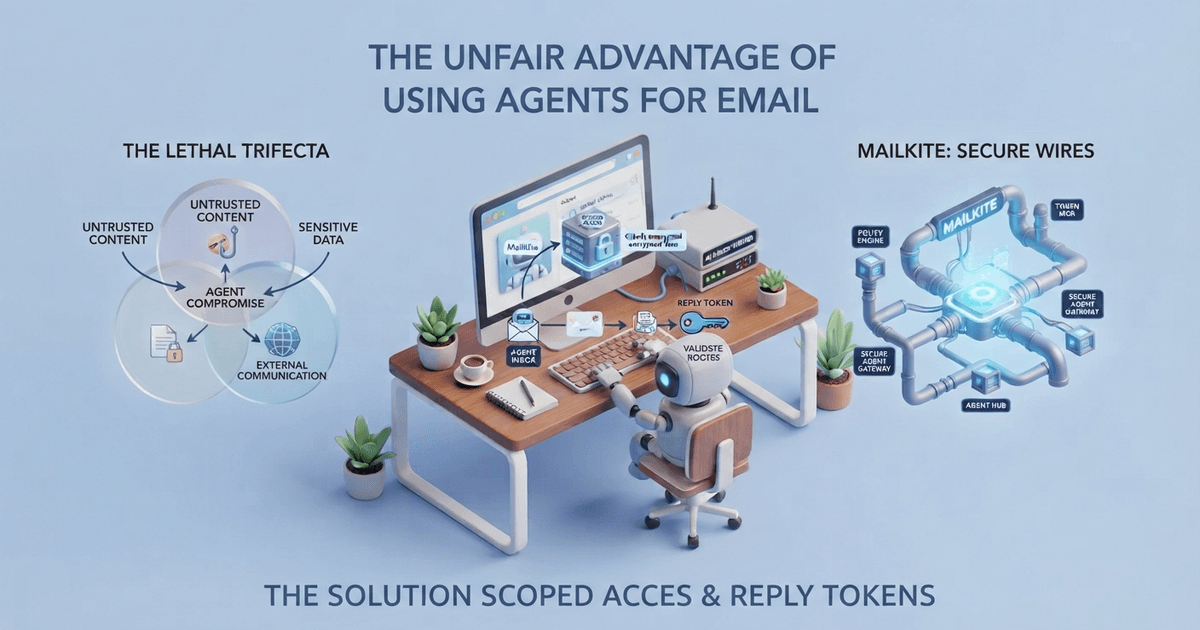
AI agents can send email. Most can't receive it. Here's what happens when you give an agent its own inbox — the Lethal Trifecta of security risks (untrusted content × sensitive data × external communication), how scoped access and reply tokens solve it, and how MailKite, which we build, wires it together.
What Makes an AI Agent Different?
If you’ve used ChatGPT or Claude, you’ve worked with AI models. But agents are different. While models respond to prompts with single outputs, AI agents make decisions and act autonomously to achieve a goal.
Think of it this way: a model writes an email when you ask it to. An agent monitors your inbox, decides which emails need responses, drafts those responses, and sends them—all without you lifting a finger. It executes a flow of actions to accomplish an objective.
This distinction matters because email has always been about workflows, not just messages. The real advantage comes when your email provider becomes part of that agent’s toolkit.
The Lethal Trifecta Problem
Here’s where things get interesting—and risky. As Martin Fowler recently wrote, granting an agent access to email triggers what security experts call the Lethal Trifecta:
- Untrusted content (anyone can email you)
- Sensitive information (your inbox contains everything from passwords to private conversations)
- External communication (the agent can reply to anyone)
Fowler notes that powerful people are already setting up agentic email, but warns: “Email is the nerve center of my life… an agent working on my email has oodles of context—and we know agents are gullible”.
This is why the right infrastructure matters. You need an email platform that gives agents controlled, scoped access—not unfettered power to read and send anything.
Where Agents Create Real Advantage
1. Smart Email Triage
Early experiments with crowdsourced email assistants (pre-AI!) showed that 72% of assistant-created tasks were accepted by users, and precision improved from 62% on day one to 85% over time. Agents can do this at scale, instantly, 24/7.
2. Autonomous Customer Support
Companies like My AskAI are already sending ~10,000 AI-powered email responses per month, resolving 75% of support tickets automatically. This isn’t a gimmick—it’s real revenue. They built this by combining AI with reliable email infrastructure that can handle automated outbound at scale.
3. Intelligent Labeling and Organization
GitHub projects like Composio’s Gmail auto-labeler use agents that react to new messages in real-time, automatically applying labels and organizing your inbox. This is the kind of ambient intelligence that just makes your email work.
4. Performance Gains
Real-world tests show AI-personalized emails can achieve 44.2% open rates compared to 42.2% for human-written controls—a statistically significant improvement. Agents can optimize this across thousands of recipients.
How MailKite Routes Work
MailKite, which we build, handles agent email infrastructure so you don’t have to build it from scratch.
MailKite Routes
MailKite provides Routes that can forward incoming emails directly to your agent. All you need to set up is the prompt that defines how your agent should respond. This eliminates the complexity of building custom email ingestion pipelines.
The architecture is simple:
The architecture is simple:
Incoming Email → MailKite Route → Your Agent → Response SentWith MailKite Routes, you configure:
- Inbound rules (which emails trigger the agent)
- Agent prompt (how the agent should process and respond)
- Response handling (how replies are sent back)
This means you can have a fully functional AI-powered email assistant in minutes, not weeks.
Advanced Security: Verified Sender Scoping
MailKite solves the Lethal Trifecta with a sophisticated authentication system that goes beyond traditional email security.
SPF + DKIM Verification
Every incoming email is verified through:
- SPF (Sender Policy Framework) validation
- DKIM (DomainKeys Identified Mail) validation
This ensures that emails claiming to be from a domain actually originated from an authorized server for that domain.
The Reply Token System
Here’s where MailKite’s innovation shines:
When MailKite sends an email, it embeds a unique, cryptographically secure token in the message. When the recipient replies, this token is included in the reply headers.
This token serves two critical purposes:
-
Sender Authentication - When MailKite receives a reply with a valid token, it confirms that the sender has access to the email address they’re replying from (because they received the original email from MailKite’s infrastructure).
-
Scoping Access - The token determines what data the agent can access:
-
Default (single message scope): The agent only has access to the specific email being replied to. This is the most restrictive and secure mode.
-
Thread scope: The token grants the agent access to the entire email thread, allowing for context-aware conversations.
-
Sender scope: The token validates the sender’s identity, allowing the agent to access all emails from/to that specific sender. This enables personalized, long-term conversations while maintaining strict boundaries.
-
Why this matters for agents:
Without this system, an agent would either have:
- No context (can’t follow conversations)
- Unlimited access (security risk)
MailKite’s token system provides graduated, verifiable access based on authenticated relationships.
Practical Example
User sends email → MailKite verifies SPF + DKIM → MailKite routes to Agent with token validation → Agent processes prompt (only sees relevant context) → Agent returns response → MailKite embeds reply token in headers → MailKite sends response to User → Subsequent replies include token granting thread or sender scopeWhat We Built Into MailKite
Most email providers weren’t built for agents. MailKite, which we built, was — here’s what’s under the hood.
The MCP Server
MailKite ships with a full Model Context Protocol (MCP) server that exposes email operations as tools agents can call:
{
  "mcpServers": {
    "mailkite": {
      "command": "npx",
      "args": ["-y", "@mailkite/mcp"],
      "env": { "MAILKITE_API_KEY": "mk_live_…" }
    }
  }
}
Agents can send mail, manage domains, handle webhooks, and route inbound messages—all from a chat interface. The tools use the same schemas as the SDKs, meaning validation is consistent across every interface.
Agent-First Architecture
From the Laravel package documentation: “Email for every product you ship—send over a verified domain, receive email as a webhook, give an AI agent its own inbox”.
This isn’t marketing copy. MailKite’s architecture treats agents as first-class citizens:
- Webhook-first inbound processing lets agents react to incoming messages in real-time
- Verified webhook signatures (using
verifyWebhook()) ensure agents only process legitimate mail - Clean APIs for sending, routing, and retrieving messages
- No dark patterns—API errors surface verbatim so agents can handle failures intelligently
Honest Failures, Not Silent Drops
Here’s a subtle but crucial advantage: MailKite throws real errors. As the Laravel transport documentation states: “Honest failures, not silent drops… API errors (unverified domain, suppressed recipient, rate limit) surface verbatim with their HTTP status”.
When your agent is autonomous, you need to know what went wrong. Silent failures break agent loops. MailKite doesn’t hide problems—it surfaces them so your agent can adapt.
The Unfair Advantage
Here’s the bottom line: most developers are building agents on infrastructure that wasn’t designed for them. They’re fighting authentication, dealing with inconsistent APIs, and building workarounds for platforms that assume a human is always in the loop.
We built MailKite for a world where agents handle email. The Routes system gets you started in minutes, the MCP integration handles advanced use cases, and the reply token system provides granular security. If you’d rather assemble these pieces yourself, Postmark’s inbound parsing plus the MCP SDK, or Cloudflare Email Workers with a custom agent loop, are both real options — they’re just more work.
The developers who adopt agent-native email infrastructure now will save months of engineering time. Their agents won’t just send email — they’ll manage it, at scale, securely.
Getting Started
Option 1: Quick Start with Routes (No Agent Code Required)
- Set up your MailKite domain
- Create a Route pointing to your agent endpoint or webhook
- Configure your agent prompt in the MailKite dashboard
- Start receiving and responding to emails automatically
Option 2: Full Custom Integration
For the Laravel package:
composer require mailkite/laravelSet your .env:
MAIL_MAILER=mailkite
MAILKITE_API_KEY=mk_live_…
MAIL_FROM_ADDRESS=hello@yourdomain.com
Then integrate with your agent framework of choice. Whether you’re using LangChain, LangGraph, or building custom, MailKite’s MCP server makes the integration trivial.
Option 3: Direct API Access
Use MailKite’s REST API directly:
curl -X POST https://api.mailkite.dev/v1/email/send \
  -H "Authorization: Bearer mk_live_..." \
  -H "Content-Type: application/json" \
  -d '{
    "from": "agent@yourdomain.com",
    "to": "user@example.com",
    "subject": "Automated Response",
    "text": "Your agent's response here"
  }'
Security Best Practices for Agent Email
When deploying agents with email access, follow these guidelines:
- Start with single-message scope - Only grant thread or sender scope when necessary
- Verify all tokens - Never trust an unauthenticated reply
- Log all agent actions - Audit trails are essential for security
- Set rate limits - Prevent abuse through token validation
- Use SPF/DKIM - Always verify incoming email authenticity
Conclusion
The question isn’t whether agents will handle email. It’s whether your infrastructure will hold them back.
MailKite, which we build, handles the infrastructure so you can focus on the agent. Routes for quick starts, MCP for advanced integration, and token-based scoping for security. Or use Postmark, SES, or Cloudflare Workers and build the agent loop yourself — the choice depends on how much of your engineering time you want to spend on email plumbing.
Start with MailKite’s Routes — all you need is a prompt. Or build your own agent loop with the tools listed above. Either way, your agents should be able to read their email.