Email you set up once and reuse for every project
If you ship a lot of small things, email shouldn't be a from-scratch chore each time: new account, verify domain, request production access, wire a parser. This is the setup you do once — one account, one API key — and what each new project costs after that: point a domain, reuse the key, drop in one webhook. With a reusable Node module and a single inbound handler that fans out to every project you run. For developers who launch many apps a year.
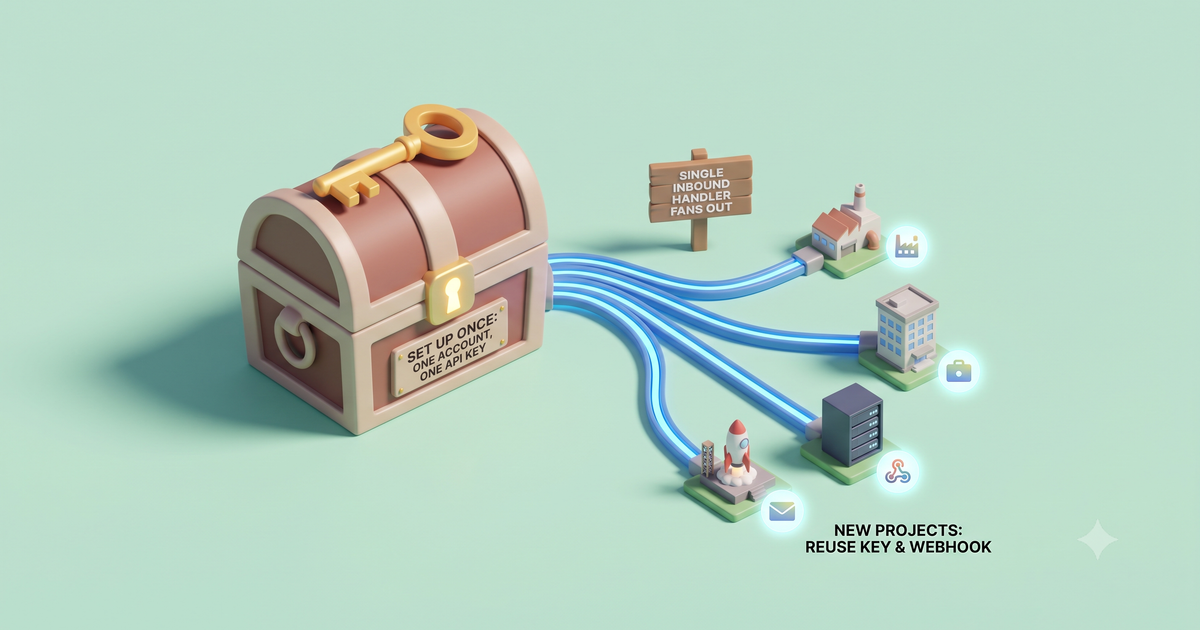
The chore isn’t sending an email — it’s doing the whole email setup again for a project that might not outlive the weekend. A serial shipper pays that tax over and over: a fresh vendor account, another domain to verify, another production-access request, another inbound parser wired up. The fix is to do the account part once and make each new project a two-line diff. Here’s the whole shape before the details.
Here’s the reusable piece — a mailer.js you write once and copy (or publish to your private registry) into every project. One key, and from is just an argument:
// mailer.js — the one email module you paste into every project
import { MailKite } from "mailkite";

const mk = new MailKite(process.env.MAILKITE_API_KEY); // same key, everywhere

// each project passes its own domain; nothing else changes.
export function makeMailer(fromDomain) {
  return {
    welcome: (to) =>
      mk.send({ from: `hello@${fromDomain}`, to, subject: "Welcome", html: "<p>You're in.</p>" }),
    magicLink: (to, url) =>
      mk.send({ from: `login@${fromDomain}`, to, subject: "Your sign-in link",
                html: `<p><a href="${url}">Sign in</a></p>` }),
  };
}
// in project B — one line to wire it up
import { makeMailer } from "./mailer.js";
const mail = makeMailer("startup-b.io"); // project A passed "side-project-a.dev"
await mail.magicLink(user.email, signInUrl);The full module — send, the signed inbound handler, and a single dispatcher that fans one webhook out to many projects — is in demo-programmable-email: clone it and npm start boots the dispatcher and self-fires a signed email.received event at its own localhost, so the inbound half runs in one command with no domain and no account (open it in StackBlitz to run it in your browser). The rest of this post is the one-time setup, then what reuse actually looks like on the inbound side.
The one-time setup
You do this part exactly once, then never again:
What each new project costs after that
Point the domain, reuse the key, drop in the webhook. That’s it — and because domains and mailboxes are unlimited on every plan, adding the tenth one doesn’t change your bill. A new project’s email work is now smaller than its favicon.
const mail = makeMailer("new-domain.app"). The key, the module, and the inbound handler are already written. No new account, no approval, no parser.Reuse the inbound side too: one handler, every project
Sending is the easy half. The half that usually makes people spin up a new setup per project is receiving — but it doesn’t have to. Every inbound message carries the address it was sent to, so one endpoint can dispatch to whichever project owns that domain.
Here it is in code — verify once, switch on the recipient’s domain:
// one-inbound-handler.mjs — dispatches inbound mail to the right project
import express from "express";
import { MailKite } from "mailkite";

const app = express();
const SECRET = process.env.MAILKITE_WEBHOOK_SECRET;
app.use("/hooks/email", express.raw({ type: "application/json" }));

// map a domain to whatever that project does with an inbound email
const projects = {
  "side-project-a.dev": (msg) => saveFeedback(msg),
  "startup-b.io":       (msg) => routeSupportTicket(msg),
  "weekend-test-c.app": (msg) => replyWithAI(msg),
};

app.post("/hooks/email", (req, res) => {
  // HMAC signature, replay window, constant-time compare — one call, verify once
  if (!MailKite.verifyWebhook(req.headers["x-mailkite-signature"], req.body, SECRET)) {
    return res.sendStatus(401);
  }
  res.sendStatus(200);

  const event = JSON.parse(req.body);
  if (event.type !== "email.received") return;

  const domain = event.to[0].address.split("@")[1]; // e.g. "startup-b.io"
  projects[domain]?.(event);                          // hand the parsed message to the right project
});

app.listen(3000);
One deployed endpoint now serves inbound for every domain you own. Add a project, add a line to the map. The message is already decoded — event.text, event.html, event.attachments, and an auth block with the SPF/DKIM/DMARC verdicts — so there’s no MIME parsing and no per-project webhook to stand up.
Don’t take the decoded payload on faith — fire a signed email.received event and watch the parsed body and auth block come back:
Where I won’t overclaim
Reuse has an honest limit: sometimes you want isolation, not sharing. If a client project needs its own billing boundary, its own key you can rotate without touching anything else, or its own audit trail, give it its own API key (you can mint several) and, if you like, its own account — that’s the right call for a handoff you’ll eventually transfer to the client. The set-up-once pattern is for your portfolio, the dozen things you run yourself where a shared account and one reusable module save real time. It’s not an argument against ever drawing a boundary; it’s an argument against redoing the whole setup for a landing page you’ll delete in a month.
FAQ
Can I really use one API key across multiple projects?
Yes. The key is scoped to your account, not to a domain, so the same MAILKITE_API_KEY sends from every domain you’ve verified. Pass from per project. If you’d rather isolate a project, mint a separate key — you can have several — but you don’t have to.
Do I need a separate webhook per project?
No. Every inbound message includes the address it was sent to, so one verified endpoint can dispatch by recipient domain to whichever project owns it. The example above is the whole pattern: verify once, switch on event.to[0].address.
How long does adding a new domain take? As long as your DNS takes to propagate. You add three records (MX to receive, SPF and DKIM to send) and there’s no production-access review to wait on — once the records verify, that domain can send to anyone and receive to your webhook.
What do I copy into each new project?
Just the small mailer.js module (or import it from your private registry) and the shared inbound handler if the project receives mail. Both are in the demo repo. The API key comes from your environment; the domain is the one argument that changes.
If every new repo means redoing your email setup from zero, do it once instead. Clone demo-programmable-email (or run it in your browser) for the reusable module and the one-handler dispatcher, then point a domain at MailKite and reuse the same key on your next launch.
Related: why we built free programmable email for developers, parse inbound email to JSON in Node.js, and verify inbound webhooks with HMAC.