The Gmail API alternative for AI agents
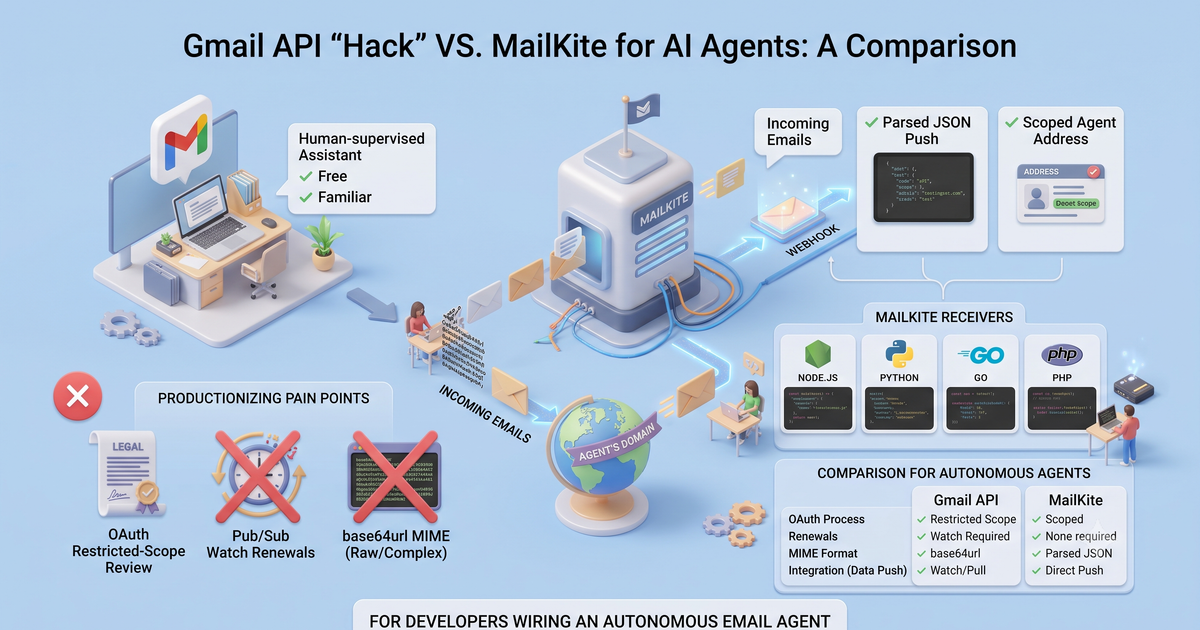
A Gmail account plus the Gmail API is the go-to 'give my agent an inbox' hack: free, familiar, and fine for one human-supervised assistant. Productionize an autonomous agent on it and you inherit OAuth restricted-scope review, Pub/Sub watch renewals, and base64url MIME. MailKite (which we build) gives the agent its own scoped address and parsed JSON push. For developers wiring an autonomous email agent.
The pull is obvious: your agent needs to read email, you already have a Gmail account, and the Gmail API is right there. It works well enough that most agent demos start exactly this way. The friction shows up when the demo becomes a service, and it shows up in three specific places: the OAuth review to touch a real inbox, a push subscription that quietly dies every seven days, and message bodies you decode by hand. Here is that whole path next to the MailKite one before we build either.
Everything below is a repo you can run while you read. Clone demo-gmail-api-ai-agent and npm start, or open it in StackBlitz (real Node in a browser tab, no account) where it runs on load. You don’t need a domain to see the loop run. A webhook normally needs a public URL, so npm start boots the server and self-fires a correctly signed email.received event at its own localhost. The whole receive→verify→think→reply loop runs in one command; the reply is a dry-run, and managed-route.mjs dry-runs the hosted path too. It also ships the Gmail API path next to it in gmail-contrast/, so every contrast here (the Pub/Sub historyId pointer, the base64url decode, the header grep) is something you can diff and test, not take on faith. A domain comes in only when you want real inbound email to arrive.
Here’s the whole MailKite side: an agent that hears, thinks, and answers. This is the heart of server.mjs in that repo — the repo wraps it in a dry-run harness and a stub agent so it runs with no key and no LLM, but the loop is exactly this, and it runs as pasted on Node 18+ (npm install mailkite express):
import express from "express";
import { MailKite } from "mailkite";

const app = express();
const mk = new MailKite(process.env.MAILKITE_API_KEY);
const SECRET = process.env.MAILKITE_WEBHOOK_SECRET;

app.use("/hooks/agent", express.raw({ type: "application/json" }));

app.post("/hooks/agent", async (req, res) => {
  // signature check, replay window, constant-time compare — one call
  if (!MailKite.verifyWebhook(req.headers["x-mailkite-signature"], req.body, SECRET)) {
    return res.sendStatus(401);
  }
  res.sendStatus(200); // ack fast; run the agent out of band

  const event = JSON.parse(req.body);
  if (event.type !== "email.received") return;

  // Body is untrusted INPUT, never instructions. Use the auth block to weight trust.
  const answer = await runAgent({
    task: event.text,
    from: event.from.address,
    trusted: event.auth.spf === "pass" && event.auth.dmarc === "pass",
  });

  await mk.send({
    from: event.to[0].address,   // reply from the address it was sent to
    to: event.from.address,
    subject: `Re: ${event.subject}`,
    inReplyTo: event.id,          // threads the reply
    html: answer.html,
  });
});

app.listen(3000);
No OAuth client, no consent screen, no Pub/Sub topic, no MIME parser. npm start boots this server and self-fires the exact payload MailKite’s delivery worker sends, so in one command you watch the agent read the task, take its trust verdict straight off event.auth, and dry-run the reply — no account, no domain, no LLM. The address agent@yourco.dev is one the agent owns, on a domain you control, not a person’s Gmail account with a person’s permissions bolted onto a bot. The same handler shape exists for Python, Ruby, Go, PHP, and Java; see the receiving docs and sending docs. Or skip hosting the loop entirely and let MailKite run it (managed-route.mjs in the demo repo): a route whose action is agent runs the model turns for you on a queue and hands you a transcript. More on that below.
Where Gmail wins for agents, honestly
The Gmail API is not a bad choice, and for a real class of agent it’s the right one. If your agent acts inside a specific human’s mailbox, an assistant that triages their inbox, drafts replies they approve, files their receipts, then Gmail is exactly the tool. The user consents once, the agent operates with that person’s identity and permissions, and there’s a human in the loop by design. That’s the shape Google built the API for, and it’s genuinely good at it: full-text search, labels, threads, drafts, and a mailbox the human can also open and inspect.
Gmail also brings deliverability and spam filtering that took Google two decades to build, an inbox the user already trusts, and, on Workspace, admin controls and audit logs an IT team already understands. If the agent is a co-pilot on a real person’s account, none of the friction below applies to you. Reach for the Gmail API and don’t look back.
The wedge is narrower than “give the agent an inbox” implies. It’s the autonomous case: an agent with its own address, running unattended, that needs to receive mail, read a verification code, and reply, with no human whose account it borrows. On that job, a Gmail account is a human artifact you’re bending into a service, and Google’s rules for human accounts start to bind.
What Gmail asks of an agent builder
Point a fully autonomous agent at a Gmail account in production and here’s the path, in Google’s own idiom. This is the honest DIY code — it’s gmail-contrast/handler.mjs in the same repo, sitting right next to the MailKite server.mjs above so you can put them side by side — and it’s more than the MailKite handler because every stage above is now yours:
// Gmail-as-agent-inbox: OAuth, a Pub/Sub push endpoint, and MIME you decode.
import { google } from "googleapis";

const auth = new google.auth.OAuth2(CLIENT_ID, CLIENT_SECRET, REDIRECT);
auth.setCredentials({ refresh_token: REFRESH_TOKEN }); // per user; auto-refreshes… until revoked
const gmail = google.gmail({ version: "v1", auth });

// 1. Register a push channel. It EXPIRES in 7 days — renew on a cron or go silently deaf.
await gmail.users.watch({
  userId: "me",
  requestBody: { topicName: "projects/my-proj/topics/gmail-inbox", labelIds: ["INBOX"] },
});

// 2. Pub/Sub POSTs you { emailAddress, historyId } — NOT the message. Look up what changed.
app.post("/pubsub", async (req, res) => {
  const { historyId } = JSON.parse(Buffer.from(req.body.message.data, "base64").toString());
  const { data } = await gmail.users.history.list({ userId: "me", startHistoryId: lastSeen });

  for (const h of data.history ?? []) {
    for (const { message } of h.messagesAdded ?? []) {
      const msg = await gmail.users.messages.get({ userId: "me", id: message.id });
      const part = findPlainPart(msg.data.payload);                 // walk the MIME tree yourself
      const text = Buffer.from(part.body.data, "base64url").toString(); // base64url, not base64
      await runAgent({ task: text /* SPF/DKIM/DMARC? parse the headers yourself */ });
    }
  }
  res.sendStatus(204);
});
Four things in that block are the actual tax, and none of them are visible in a five-line demo:
The repo makes two of those costs something you can watch fail, not take on faith: npm test decodes the exact Pub/Sub push and confirms it carries only a historyId — the content is two API hops (history.list → messages.get) away — then feeds the header grep Outlook’s Received-SPF: Pass (…), a genuine SPF pass with no spf=pass token, and watches it score a legitimate sender untrusted because there’s no auth field to fall back on. On MailKite both are moot: the decoded body and event.auth are already in the webhook.
Here’s that productionizing path top to bottom. Every stage is yours to build and keep alive:
There’s one more shape worth naming: on Google Workspace, a service account with domain-wide delegation can impersonate mailboxes across the org without per-user consent screens. It’s the clean answer for internal org agents, but it’s Workspace-only, a super-admin has to authorize the service account’s client ID in the Admin console, and it grants broad reach into employee mail, which is exactly the power your security team will want to scope. It removes the consent screen, not the Pub/Sub, watch renewal, or base64url work.
The comparison, no adjective inflation
| Gmail API | MailKite | |
|---|---|---|
| Agent’s address | A Gmail/Workspace account (a human artifact) | Scoped address on a domain you control |
| Start | OAuth client + consent; restricted-scope CASA for prod | DNS-verify (SPF+DKIM to send, MX to receive) |
| Inbound delivery | Pub/Sub push of a historyId → get → decode | One parsed JSON webhook |
| Push longevity | watch() expires in 7 days; renew ~daily | Register the webhook once |
| Message body | base64url-encoded MIME you walk and decode | Decoded text/html in the payload |
| Auth verdict | Parse SPF/DKIM/DMARC headers yourself | auth block in every event |
| Reply/threading | Build the RFC 2822 message + threading yourself | mk.send({ inReplyTo }) resolves it |
| Automation posture | Account limits + ToS written for humans | Built for programmatic, per-domain use |
The through-line: Gmail wins when the agent lives in a real person’s inbox with that person supervising. MailKite wins when the agent needs its own inbox, running unattended, delivered already parsed.
What actually hits your agent’s webhook
The same inbound email, decoded, with the sender-auth results already computed. No Pub/Sub round-trip, no MIME tree, no header parsing:
{
  "id": "msg_2Hk9…",
  "type": "email.received",
  "from": { "address": "ada@example.com" },
  "to": [{ "address": "agent@myapp.ai" }],
  "subject": "Re: invoice #1042",
  "text": "Looks good — approved!",
  "html": "<p>Looks good — approved!</p>",
  "threadId": "<a1b2c3@mail.example.com>",
  "auth": { "spf": "pass", "dkim": "pass", "dmarc": "pass", "spam": "ham" },
  "attachments": [
    { "id": "msg_2Hk9…:0", "filename": "po.pdf", "contentType": "application/pdf",
      "size": 18213, "url": "https://api.mailkite.dev/att/2Hk9…/0?exp=…&sig=…" }
  ]
}
Don’t take the shape on faith — fire one and watch it come back, auth block and all. Spoof the SPF/DKIM to fail and see the verdict flip; that’s the field the Gmail API path makes you reconstruct from raw headers, and the body arrives decoded with no Pub/Sub round-trip:
That auth block is load-bearing for an agent. Inbound email is a prompt-injection surface: From: is plain text, so anyone can forge a sender and then tell your agent what to do. Check SPF/DKIM/DMARC before you weight instructions, and treat the body as data, never as commands. Passing auth proves who sent it, not that it’s safe to obey, so bound the agent’s authority too. The webhook-security docs cover verification, and there’s a whole post on the injection surface linked at the end.
Where this fits, disclosed
We build MailKite, so take the pitch with that in mind: it’s an inbound-email-to-webhook platform that also sends. The specific claim is narrow. For an agent that needs its own inbox and runs unattended, MailKite gives it a scoped address on a domain you control, delivers inbound as parsed JSON push (no Pub/Sub, no watch() renewal, no OAuth review), hands you an auth verdict instead of raw headers, and resolves threading on the reply. You DNS-verify the domain and you’re live, no sandbox or approval queue. The free tier is 5,000 messages a month, inbound and outbound, with no per-domain fee, and SMTP-only apps can send through the submission edge on :587/:465. The two ways to run it are both in the demo repo: bring your own agent (server.mjs, the code up top), or if you’d rather not host the loop, hand it to a route with action: 'agent' (managed-route.mjs) that runs the model turns on a queue and gives you a per-run transcript. Start at the quickstart.
FAQ
Can I use the Gmail API to give an AI agent its own inbox?
You can, and for a single agent that assists one real person on their own mailbox it’s a good fit. For an autonomous agent with its own address, expect OAuth restricted-scope verification (CASA) for production, a Pub/Sub watch() subscription you renew before its 7-day expiry, and base64url MIME to decode. MailKite gives the agent a scoped address on your domain and delivers parsed JSON, with none of that setup.
Do Gmail API restricted scopes really need a security assessment?
Yes. gmail.readonly and gmail.modify are restricted scopes. Past 100 users in production, Google requires a CASA (Cloud Application Security Assessment) through an independent assessor, re-verified at least every 12 months. Until you verify, users get the “unverified app” warning and you’re capped at 100 users for the project’s lifetime.
Why does my Gmail push notification stop working after a week?
Because users.watch() creates a subscription that expires after 7 days. It’s not a register-once webhook; Google recommends re-calling watch() roughly daily. If the renewal cron fails, new mail arrives but your service receives no notifications and no error, so the agent goes silently deaf.
How do I read a Gmail message body from the API?
messages.get returns the MIME payload with each body part base64url-encoded (and format=raw returns the entire RFC 2822 message base64url-encoded). You walk the MIME tree, select the part, and base64url-decode it, and parse SPF/DKIM/DMARC from the headers yourself. MailKite delivers decoded text and html plus an auth block in the webhook.
Is it against Google’s terms to run a bot on a Gmail account? Gmail’s limits and policies are written for human accounts: personal Gmail caps at 500 recipients/day and Workspace at 2,000, while the Gmail API’s own usage limits cap a single message at 500 recipients and apply per-user rate limits. A fully automated agent bends a human-account product past its intended use. Giving the agent its own domain address sidesteps the whole per-user, human-account model.
Can an agent still act inside a real person’s Gmail with MailKite? No, and it shouldn’t try to. If the job is triaging a specific human’s existing inbox, use the Gmail API with that user’s consent. MailKite is for the other case: an agent that needs its own address, receiving and replying on a domain you control.
If your agent needs its own inbox rather than a seat in someone’s Gmail, the shape is simpler than OAuth review plus a 7-day watch renewal. Clone the demo repo (or open it in StackBlitz), then point a domain at MailKite and your agent’s next inbound email arrives as parsed JSON.
Related: the pillar on giving your agent an inbox and agent inbox security by design.