Email parser API: parse inbound email to JSON with a webhook
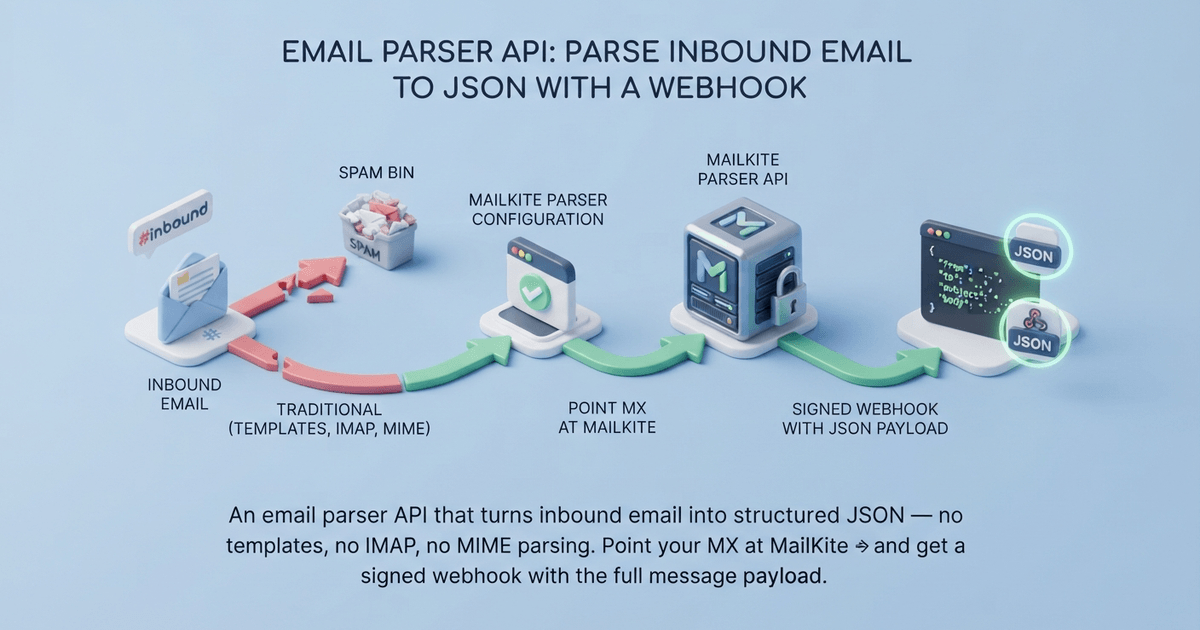
An email parser API that turns inbound email into structured JSON — no templates, no IMAP, no MIME parsing. Point your MX at MailKite and get a signed webhook with the full message payload.
An email parser API takes incoming email and returns structured data your app can use. The traditional approach — Mailparser, Parseur, Parsio — gives you a template editor: you highlight a field, name it, and hope future senders match the layout. The API approach is different: point your domain’s MX records at a parsing service, and every inbound message arrives at your endpoint as clean JSON — headers split out, body decoded, attachments extracted — without you ever writing a regex or maintaining a template.
MailKite is that API. You add a domain, register a webhook, and every email to *@yourdomain.com is parsed and POSTed to your endpoint as a signed JSON payload. No mail server, no IMAP polling, no mailparse in your dependency tree. See the inbound email API for the full product picture, or the complete email-to-webhook guide for a multi-language deep dive. Here’s how it works with real code.
How it works
Three steps:
- Add your domain to MailKite. You get an MX record to publish in your DNS.
- Register a webhook — the URL where parsed email lands.
- Handle the POST. Verify the HMAC signature, read the JSON body, return
2xx.
Every email to any address on that domain is parsed and delivered the same way. No per-sender templates, no mailbox connections, no polling intervals.
Set up the domain
Add your domain via the dashboard or CLI:
npx @mailkite/cli domains add mail.yourapp.com --jsonMailKite returns the DNS records to publish:
Type: MX   Host: @   Priority: 10   Value: mx1.mailkite.dev
Type: TXT  Host: @   Value: "v=spf1 include:mailkite.dev ~all"
Type: TXT  Host: mailkite._domainkey   Value: "v=DKIM1; k=rsa; p=..."
Type: TXT  Host: _dmarc   Value: "v=DMARC1; p=none;"
Add these to your DNS provider. Once the MX record propagates (usually under 5 minutes), MailKite activates the domain and starts receiving.
Register your webhook
npx @mailkite/cli webhook set <domainId> https://yourapp.com/hooks/mailkite --jsonYour webhook is signed with your account’s webhook secret (whsec_…) — copy it from the MailKite dashboard under your domain’s webhook settings. You’ll need it to verify incoming webhooks.
Parse email in Node.js
import express from "express";
import { MailKite } from "mailkite";

const app = express();
const PORT = process.env.PORT || 3000;
const WEBHOOK_SECRET = process.env.MAILKITE_WEBHOOK_SECRET;

// CRITICAL: use express.raw() — not express.json().
// The HMAC covers the raw bytes; JSON parsing first would break verification.
app.use("/inbound", express.raw({ type: "application/json" }));

app.post("/inbound", (req, res) => {
  // 1. Verify the signature
  const sig = req.headers["x-mailkite-signature"] || "";
  if (!MailKite.verifyWebhook(sig, req.body, WEBHOOK_SECRET)) {
    return res.status(401).send("Invalid signature");
  }

  // 2. Parse the payload
  const email = JSON.parse(req.body);

  console.log("From:", email.from.address);
  console.log("To:", email.to[0]?.address);
  console.log("Subject:", email.subject);
  console.log("Text:", email.text);
  console.log("HTML:", email.html);
  console.log("Attachments:", email.attachments?.length ?? 0);

  // 3. Do your work — store it, forward it, trigger a workflow
  res.status(200).send("OK");
});

app.listen(PORT, () => console.log(`Listening on :${PORT}`));
The payload you get
Every inbound email arrives as a JSON object with these fields:
{
  "type": "email.received",
  "id": "msg_abc123",
  "threadId": "<abc123@example.com>",
  "from": { "address": "sender@example.com", "name": "Sender" },
  "to": [{ "address": "hello@mail.yourapp.com", "name": "" }],
  "subject": "Project update — Q3 timeline",
  "text": "Hi team,\n\nHere's the Q3 update...",
  "html": "<p>Hi team,</p><p>Here's the Q3 update...</p>",
  "receivedAt": 1783693800000,
  "receivedAtIso": "2026-07-10T14:30:00.000Z",
  "auth": { "spf": "pass", "dkim": "pass", "dmarc": "pass", "spam": "ham" },
  "attachments": [
    {
      "filename": "report.pdf",
      "contentType": "application/pdf",
      "size": 48200,
      "url": "https://api.mailkite.dev/att/abc123/0?exp=1754265600&sig=…"
    }
  ]
No template mapping. No field extraction rules. The entire message — from, to, subject, text, HTML, and attachments — arrives in one object. If you need to pull a tracking number from the subject or a PO number from the body, that’s a string operation in your code, not a template you maintain.
Parse email in Python
import os
from flask import Flask, request, abort
from mailkite import verify_webhook

app = Flask(__name__)
WEBHOOK_SECRET = os.environ["MAILKITE_WEBHOOK_SECRET"]

@app.post("/inbound")
def handle_inbound():
    sig = request.headers.get("X-MailKite-Signature", "")
    if not verify_webhook(sig, request.get_data(), WEBHOOK_SECRET):
        abort(401)

    email = request.get_json()

    # Extract what you need
    subject = email["subject"]
    sender = email["from"]["address"]
    body = email["text"]

    # Process: store in DB, trigger workflow, etc.
    return "OK", 200
Why not just use a template-based parser?
Template-based email parsers (Mailparser, Parseur, Parsio) work like this: you forward emails to their inbox, open the template editor, highlight the fields you want, name them, and save. When a matching email arrives, the parser extracts those fields and sends them to your app via webhook or integration.
That works until it doesn’t. Here’s where the model breaks down:
| Problem | Template-based | API-first (MailKite) |
|---|---|---|
| New sender format | Build a new template | No change — JSON payload is format-agnostic |
| Field location changes | Edit the template | Your code handles the new layout |
| Volume pricing | Per-email credits ($30–300/mo) | Unlimited free domains, usage-based |
| Attachment parsing | Limited (PDFs only on paid plans) | Every attachment type, URL-accessible |
| Template maintenance | Ongoing — every sender is a template | Zero — the API is the parser |
| Latency | Forward → parse → deliver (seconds) | MX edge → webhook (sub-second) |
The template model is designed for non-technical users who want to extract data from emails without writing code. The API model is for developers who want to parse email as part of a program — the parsing is a step in a pipeline, not an end in itself.
When an API-first parser makes sense
- Multi-product teams — you ship several products, each with its own domain. A template per sender per domain doesn’t scale. One webhook per domain does.
- AI agents — agents need structured email data in real time, not a SaaS dashboard. The webhook lands in their handler directly.
- Transactional workflows — order confirmations, support tickets, notification routing. The email IS the trigger; you need the data in code, not in a spreadsheet.
- Attachment processing — PDFs, images, CSVs attached to inbound email. The API gives you a URL to fetch; no template needed for each document type.
FAQ
What’s the difference between an email parser API and an inbound email API?
They’re the same thing from different angles. “Email parser API” focuses on the extraction — turning raw email into structured data. “Inbound email API” focuses on the delivery — getting email from the internet to your app. MailKite does both: it receives email over SMTP, parses it to JSON, and delivers it to your webhook. The API is the parser.
Do I need to run a mail server?
No. You publish an MX record pointing to MailKite’s edge. MailKite handles the SMTP connection, MIME parsing, and authentication. Your app only sees HTTP.
How does MailKite handle attachments?
Every attachment — PDF, image, CSV, ZIP — is extracted from the MIME structure and stored. The payload includes a URL you can fetch with your API key. No size limit beyond the sender’s SMTP constraints.
Can I filter which emails get parsed?
MailKite parses every email to every address on your domain. Filtering happens in your webhook handler — check the to field, the from field, the subject, or any header. Routes (address-level rules) can also forward specific addresses to different endpoints.
What about email authentication?
MailKite checks SPF, DKIM, and DMARC on every inbound message and includes the verdicts in the payload’s auth object (spf, dkim, dmarc, spam). You can enforce authentication in your handler — reject messages that fail SPF, for example — or trust MailKite’s edge to filter spoofed mail.
Is there a free tier?
Yes. Unlimited domains are free. Sending and receiving are free within generous limits. No credit card required to start — sign up at app.mailkite.dev.