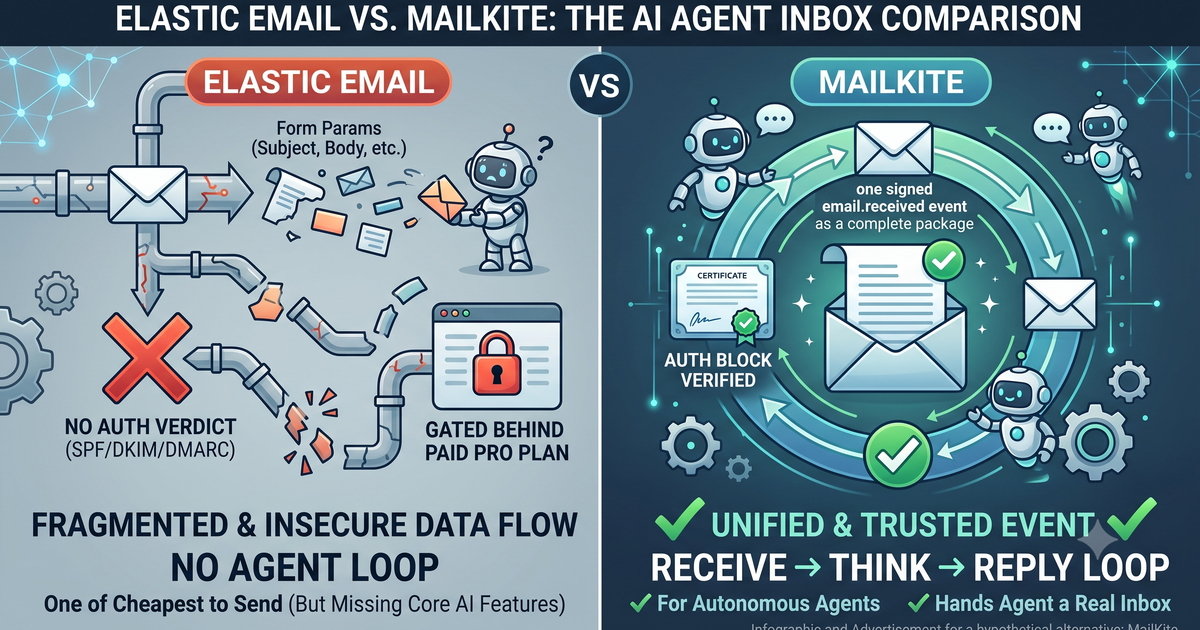
The Elastic Email alternative for AI agents
Elastic Email is one of the cheapest ways to send, and it can receive: Inbound Routing points your MX at it and POSTs parsed fields to a URL. But the payload is form params with no SPF/DKIM/DMARC verdict, it's gated behind the paid Pro plan, and there's no agent loop. MailKite (which we build) hands an autonomous agent a real inbox as one signed email.received event with an auth block and a receive→reply loop.
An autonomous agent doesn’t need the cheapest send price on the market. It needs its own real address that it can read from, decide on, and answer without a human in the loop. Elastic Email can receive mail, so this isn’t a “can’t.” It has an Inbound Routing feature, it points your domain’s MX at its servers, it parses the message, and it POSTs the fields to a URL you pick. The question is the shape of what lands, and what an agent builder rebuilds after it does. Here’s the contrast in one picture.
Everything below is a repo you can run while you read. Clone demo-elastic-email-ai-agent and npm start, or open it in StackBlitz (real Node in a browser tab, no account) where it runs on load. You don’t need a domain to see the loop run: a webhook normally needs a public URL, so npm start boots the server and self-fires a correctly signed email.received event at its own localhost — the whole receive→verify→think→reply loop runs in one command (the reply is a dry-run, and managed-route.mjs dry-runs the hosted path too). It also ships the Elastic Email path next to it in elastic-email-contrast/, so every contrast here is something you can diff and test, not take on faith. A domain comes in only when you want real inbound email to arrive.
Here’s the whole MailKite side: email in, verify the signature, hand the body to your model, reply through the same client. This is the heart of server.mjs in that repo — the repo wraps it in a dry-run harness and a stub agent so it runs with no key and no LLM, but the loop is exactly this, and it runs as pasted on Node 18+ (npm install mailkite express):
import express from "express";
import { MailKite } from "mailkite";

const app = express();
const mk = new MailKite(process.env.MAILKITE_API_KEY);
const SECRET = process.env.MAILKITE_WEBHOOK_SECRET;

app.use("/hooks/agent", express.raw({ type: "application/json" }));

app.post("/hooks/agent", async (req, res) => {
  // signature check, replay window, constant-time compare — one call
  if (!MailKite.verifyWebhook(req.headers["x-mailkite-signature"], req.body, SECRET)) {
    return res.sendStatus(401);
  }
  res.sendStatus(200); // ack fast; run the agent out of band

  const event = JSON.parse(req.body);
  if (event.type !== "email.received") return;

  // Body is untrusted INPUT, never instructions. Weight it by the auth verdict.
  const answer = await runAgent({
    task: event.text,
    from: event.from.address,
    trusted: event.auth.spf === "pass" && event.auth.dmarc === "pass",
  });

  await mk.send({
    from: event.to[0].address,   // reply from the address it was sent to
    to: event.from.address,
    subject: `Re: ${event.subject}`,
    inReplyTo: event.id,         // threads the reply
    html: answer.html,
  });
});

app.listen(3000);
That’s the receive→think→reply loop, whole. npm start boots the server and self-fires the exact payload MailKite’s delivery worker sends, so in one command you watch the agent read the task, take its trust verdict straight off event.auth, and dry-run the reply — no account or LLM required. The same handler shape exists for Python, Ruby, Go, PHP, and Java; see the receiving docs and sending docs. The rest of this post is the honest version of the diagram: where Elastic Email genuinely fits an agent, what its inbound path asks you to build, and what the parsed payload actually contains.
Where Elastic Email wins for agents, honestly
Elastic Email’s whole reputation is price. It’s a combined HTTP API and SMTP relay whose per-email cost sits at the very bottom of the market, and for one kind of agent that’s the deciding factor.
If your agent’s dominant cost is outbound volume (it sends far more than it receives: notifications, digests, bulk replies), Elastic Email’s unit economics are hard to walk away from. The paid tiers start at $19/mo for 50,000 emails, and pay-as-you-go rates are among the cheapest anywhere. It’s an SMTP relay too, so an agent built on a stack that only speaks SMTP can send through it without touching a REST client. If “send a lot, cheaply” is the job, this is a serious tool.
And the inbound side is real, not a checkbox. When you point your MX at Elastic Email, it does the SMTP termination and the MIME parsing for you and hands your endpoint decoded fields: body_text and body_html are already split out, so you’re not running a MIME parser to read the message. Attachments arrive inline as base64 in att1_content, att2_content, and so on, which is convenient for the small ones. So this isn’t “Elastic Email can’t receive.” It can, and the parse is decent. The question is what the shape costs an agent builder.
What Elastic Email asks of an agent builder
Elastic Email’s Inbound Routing works by DNS. You change your domain’s MX record to mx.inbound.elasticemail.com, then create an inbound route whose destination is an HTTP URL (the other two options are forward-to-an-address and “stop”). From then on, any mail to your domain is parsed and POSTed to that URL as form parameters: from_email, from_name, env_from, env_to_list, to_list, header_list, subject, body_text, body_html, and att1_name/att1_content for each attachment. Your endpoint has to return 200 OK.
Three things follow from that shape once an agent is the consumer.
First, it’s a paid feature. Inbound Email Processing is gated to the Pro plans (Email API Pro is $49/mo); it isn’t on the free or Starter tiers, and inbound messages draw down the same sending allowance rather than sitting in a free bucket. Confirm the current plan matrix before you build against it, but the wall is real: you can’t wire an agent’s inbox on the free tier.
Second, the delivery is unsigned form POST, not a signed JSON event. There’s no HMAC signature to verify, so anyone who learns your route URL can POST a forged email to it. Guarding that endpoint (a secret path, an IP allowlist, a shared token you check) is your job, and it’s separate from the trust question below.
Third, and this is the load-bearing one: there is no normalized authentication verdict. Nothing in the payload tells you whether SPF, DKIM, or DMARC passed, and there’s no spam score either. The only place any of that might exist is header_list, the raw header block, if an upstream relay happened to stamp an Authentication-Results line. So an agent that’s going to act on an email has to reconstruct the trust verdict itself, by string-matching raw headers, before it decides how much weight to give a sender’s instructions. Here’s that reconstruction — it’s elastic-email-contrast/handler.mjs in the same repo, sitting right next to the MailKite server.mjs above so you can put them side by side:
// Elastic Email inbound: form POST — parsed body, but no auth verdict field.
import express from "express";
const app = express();
app.use(express.urlencoded({ extended: true, limit: "30mb" })); // att content is inline base64

app.post("/hooks/elastic", async (req, res) => {
  res.sendStatus(200); // guard this endpoint yourself: a secret path, token, or IP allowlist
  const { from_email, subject, body_text, body_html, header_list } = req.body;

  // No spf/dkim/dmarc field exists. Dig the verdict out of the raw headers,
  // and hope an upstream relay stamped Authentication-Results at all:
  const spfPass = /spf=pass/i.test(header_list ?? "");
  const dmarcPass = /dmarc=pass/i.test(header_list ?? "");

  const answer = await runAgent({
    task: body_text ?? body_html ?? "",
    from: from_email,
    trusted: spfPass && dmarcPass,
  });

  // Reply is a separate product surface: the transactional send API (or SMTP).
  // Set In-Reply-To / References yourself if you want it to thread.
  await elasticSend({ to: from_email, subject: `Re: ${subject}`, ...answer });
});

app.listen(3000);
Grepping header_list for spf=pass is exactly the kind of thing that looks fine in a demo and quietly rots. The header may not be there at all, its format varies by upstream relay, dmarc= isn’t always present, and a regex over headers an attacker partly controls is a shaky foundation for a trust decision. The repo makes that failure concrete — npm test feeds this grep Outlook’s Received-SPF: Pass (…), a genuine SPF pass with no spf=pass token in it, and watches the function return false. A legitimately authenticated sender, scored untrusted, because the header format varied by relay. It’s doable. It’s just yours to get right, and it’s the check that matters most for an autonomous agent.
The reply is a separate concern too. Inbound Routing gets mail in; sending the answer is the send API (or the SMTP relay), a different surface, and threading (In-Reply-To, References) is on you to set. None of this is exotic. It’s a low-cost sender that exposes an inbound route-to-URL, not a receive→reply loop for a bot.
event.auth at the edge.The comparison, agent-relevant rows only
| Elastic Email | MailKite | |
|---|---|---|
| Product center of gravity | Low-cost sender (API + SMTP relay) | Inbound email → webhook |
| Inbound shape | Form POST params to a URL | One email.received JSON event |
| Inbound plan gate | Pro plan only (paid); draws sending allowance | Included; free tier covers inbound |
| Auth verdict (SPF/DKIM/DMARC) | Not a field — grep raw header_list | Normalized auth block |
| Spam signal | None in payload | spam: ham/spam plus auth |
| Webhook auth | Unsigned — guard the URL yourself | Signed; verifyWebhook() in one call |
| Body for the model | body_text + body_html (decoded) | Decoded text + html |
| Agent loop built in | None — wire model + send yourself | Optional route action: agent, or BYO |
| Reply + threading | Separate send API/SMTP; set headers yourself | mk.send({ inReplyTo }) resolves it |
| Start | MX to mx.inbound… + create route (Pro) | DNS-verify, one webhook |
The through-line: Elastic Email wins when the agent’s work is send-heavy and price is the deciding factor, and you’re already paying for a Pro plan. MailKite wins when the agent’s work is “own an address, read what arrives, decide, reply safely,” because the signed delivery, the trust verdict, and the reply path are already assembled.
What actually hits your agent’s webhook
Here’s the MailKite email.received event: a signed JSON body, a resolved threadId, attachments as short-lived signed URLs, and the auth block that the Elastic Email path made you reconstruct from raw headers.
{
  "id": "msg_2Hk9…",
  "type": "email.received",
  "from": { "address": "ada@example.com" },
  "to": [{ "address": "agent@myapp.ai" }],
  "subject": "Re: invoice #1042",
  "text": "Looks good — approved!",
  "html": "<p>Looks good — approved!</p>",
  "threadId": "<a1b2c3@mail.example.com>",
  "auth": { "spf": "pass", "dkim": "pass", "dmarc": "pass", "spam": "ham" },
  "attachments": [
    { "id": "msg_2Hk9…:0", "filename": "po.pdf", "contentType": "application/pdf",
      "size": 18213, "url": "https://api.mailkite.dev/att/2Hk9…/0?exp=…&sig=…" }
  ]
}
Don’t take the shape on faith — fire one and watch it come back, auth block and all. Spoof the SPF/DKIM to fail and see the verdict flip; that’s the field the Elastic Email path makes you reconstruct from raw headers:
From: is plain text and trivially forged, so an email body is untrusted input, a prompt-injection vector, not instructions. The auth block is how the agent decides how much to trust a sender before it acts, without string-parsing a header itself. It’s necessary, not sufficient; the real defense is bounding what a fooled agent can do, but starting from a normalized verdict beats starting from a regex over headers an attacker partly controls.
Two ways to run it on MailKite
MailKite, which we build, gives an agent a scoped address on a domain you control (agent@yourco.dev), and runs the loop one of two ways — both in the repo. Bring your own (server.mjs): the inbound webhook hits your endpoint, your model runs, you reply with mk.send(), which is the code at the top. Or let MailKite run it (managed-route.mjs): create a route whose action is agent with an agentPrompt, and the model loop runs on a durable Cloudflare Queue with an agent_runs ledger and a per-route transcript you can drill into, capped and reaped so a slow model call can’t wedge ingest. Either way there’s no IMAP on a bot, no shared personal Gmail, no OAuth token-refresh churn, and no MIME parsing. To start, DNS-verify the domain (SPF + DKIM to send, MX to receive); there’s no sandbox or approval wait, the free tier is 5,000 messages a month across inbound and outbound with no per-domain fee, and SMTP-only apps can send through the submission edge on :587/:465. If you cloned demo-elastic-email-ai-agent at the top, managed-route.mjs dry-runs the route creation and elastic-email-contrast/handler.mjs is the same job the Elastic Email way — npm test runs both sides so you can watch the header-grep miss a real pass before you decide which shape you want.
FAQ
Can Elastic Email receive inbound email?
Yes. Elastic Email’s Inbound Routing points your domain’s MX at mx.inbound.elasticemail.com, parses the message, and POSTs the fields (from_email, subject, body_text, body_html, header_list, att1_content, and more) to an HTTP URL you configure. MailKite delivers the same message as a single signed email.received JSON event with a normalized auth block.
Does Elastic Email’s inbound payload include an SPF/DKIM/DMARC verdict?
No. There’s no SPF, DKIM, DMARC, or spam field in the inbound POST. The only authentication signal is whatever an upstream relay stamped into the raw header_list, which you’d have to string-parse yourself. MailKite normalizes it into auth: { spf, dkim, dmarc, spam } at the edge.
Is Elastic Email’s inbound feature free? No. Inbound Email Processing is gated to the Pro plans (Email API Pro is $49/mo at the time of writing), not the free or Starter tiers, and inbound messages draw from your sending allowance. MailKite’s free tier of 5,000 messages/month covers inbound and outbound with no per-domain fee. Confirm current numbers on each pricing page before you commit.
Is Elastic Email good for AI agents? For a send-heavy agent where price is the deciding factor, yes: it’s one of the cheapest senders around and speaks both API and SMTP. For an agent whose core job is receive→decide→reply safely, you’ll rebuild the trust verdict, the webhook authentication, the reply threading, and the loop. MailKite ships those.
Can I keep sending on Elastic Email and run the agent on MailKite?
Yes. They’re not exclusive. Keep bulk or transactional sending on Elastic Email for the price, and point the agent’s address (a subdomain or a separate domain) at MailKite so it receives signed JSON with an auth block and replies over the Send API.
If your agent is fishing an SPF result out of a raw header block before it dares trust an email, that’s the seam. Clone the demo repo (or run it in your browser), then point a domain at MailKite and your agent’s next inbound email arrives parsed, authenticated, and ready to answer.
Related: the pillar on giving your agent its own inbox, and agent inbox security by design.