MailKite SMTP for WordPress is on WordPress.org
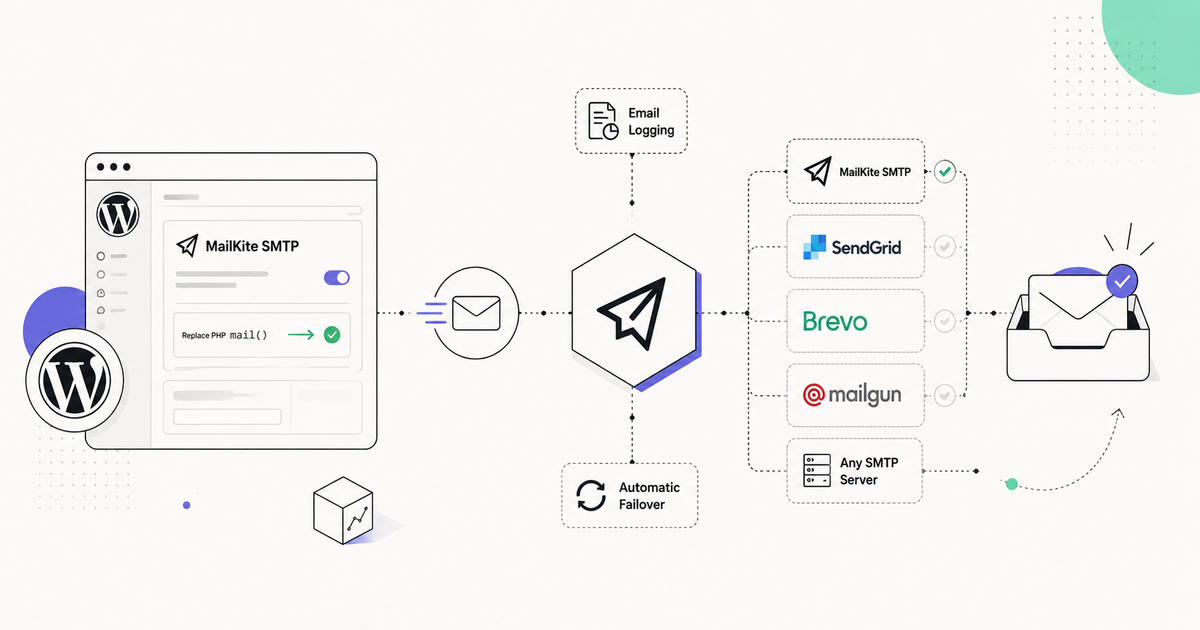
MailKite SMTP, the WordPress plugin we build, is now listed in the WordPress.org plugin directory. It replaces PHP mail() with delivery through MailKite, SendGrid, Brevo, Mailgun or any SMTP server, keeps a free email log, fails over automatically when a send fails, and receives email into WordPress. Version 0.4.2, GPL-2.0, free with no Pro tier.
Install it from Plugins → Add New (search “MailKite SMTP”), or from the command line:
wp plugin install mailkite-smtp --activate
wp mailkite test you@example.com
Listing: wordpress.org/plugins/mailkite-smtp. Source: github.com/mailkite/mailkite-smtp. Requires WordPress 6.2 and PHP 8.1.
What you can do now
- Send through the provider you already have. MailKite, SendGrid, Brevo, Mailgun with your own API key, or any SMTP host. Routing rules send WooCommerce receipts through one mailer and newsletters through another, by subject or recipient.
- Stop losing email silently. If an API send fails, the same message retries through your SMTP server or PHP mail, and the log entry says it fell back instead of reporting a success you did not get. Failure alerts go to email, Slack, Discord, or any webhook, rate-limited so an outage does not become an alert storm.
- Read the log without paying for it. Every message, its status, the mailer that sent it, and the error verbatim when there was one. One-click resend of failures, CSV export, configurable retention. Most SMTP plugins put this behind a paid tier.
- Receive email in WordPress. Turn inbound on in one click and replies, bounces, and out-of-office notices land in the log next to the message they answer. Reply from wp-admin, in-thread, from your own domain. Or forward everything to an address you already read.
- Move over in one click from WP Mail SMTP, Easy WP SMTP, FluentSMTP, or Post SMTP. The importer reads their settings; you confirm and send a test.
Getting started
After activation, the settings screen shows one section per mailer and only the one you pick. Choosing MailKite creates an account from your email address if you do not have one, and the plugin picks up the API key from there. Choosing any other provider asks for its key or SMTP credentials, which are stored encrypted with a key derived from your wp-config salts.
The Send Test tab reports which mailer handled the message and the provider’s error text when one comes back. The same check runs from WP-CLI:
wp mailkite status
wp mailkite test you@example.com
wp mailkite log
For automated provisioning, set MAILKITE_API_KEY and MAILKITE_DEFAULT_MAILER in wp-config.php and skip the settings screen entirely. Settings export and import (secrets excluded) cover the rest of a multi-site rollout. The WordPress setup guide walks through each mailer.
Inbound email fires a WordPress action
Every received message fires one hook. The plugin has already verified the webhook signature and stored the message before your code runs, so a handler is a few lines in functions.php:
// functions.php — runs for every inbound message the plugin receives.
// The plugin has already verified the signature and logged the mail.
add_action('mailkite_smtp_inbound', function (array $message) {
    // $message is the event payload: id, threadId, subject, text, html, attachments,
    // and from/to as objects — $message['from']['address'], not a plain string.
    $subject = $message['subject'] ?? '';
    $sender  = $message['from']['address'] ?? '';

    if (str_contains($subject, '[support]')) {
        wp_insert_post([
            'post_type'    => 'ticket',
            'post_title'   => $subject,
            'post_content' => $message['text'] ?? '',
            'post_status'  => 'publish',
            'meta_input'   => [
                'from'       => $sender,
                'thread_id'  => $message['threadId'] ?? $message['id'] ?? '',
            ],
        ]);
    }
});
Turning inbound on registers the webhook and its signing secret on your MailKite domain from inside WordPress. There is no URL to copy and no secret to paste. The REST route rejects an unsigned request in its permission callback, before any handler code runs. Inbound needs a MailKite account with a verified domain; sending does not.
Logs that cannot leak a reset link
A stored email log is also a stored copy of every password-reset link your site ever sent. The plugin redacts the body of password-reset, login, and verification emails by default, so a leaked database or an over-shared log page contains the subject and the outcome but never the link. You can turn this off per site if you accept the risk.
Received mail that belongs to a user’s personal mailbox (the companion MailKite Mailboxes plugin) never appears in the site-wide log. Ownership is part of the query in the log store, not a filter in the template, and every reader of the log tables goes through the store. That last part is what the 0.4.2 release fixed: the WordPress.org review found the REST log endpoint selecting the table directly and skipping the restriction, and auditing the other readers turned up the same omission in the WP-CLI listing, Site Health, and the weekly summary. All four now read through the store.
Three review rounds, one real bug
The listing took three rounds with the WordPress.org plugin review team. Rounds one and two were what a static scanner flags on any plugin that talks to an API: a hostname it could not resolve from a settings value, a permission callback it could not see through a shared variable, a prepared query assigned through a ternary. Each was restructured so the answer is visible on a read. Round three was the log-scoping bug above, which was real. The full history is in the repo’s changelog.
What it costs
The plugin is free, GPL-2.0, and every feature in it is free: logs, failover, alerts, inbound, migration, WP-CLI. There is no Pro tier. It works fully with your own SMTP server or a SendGrid, Brevo, or Mailgun key and never requires a MailKite account. MailKite itself has a free plan and paid plans, and inbound email is the one feature that needs it, because someone has to run the MX.
Get started
The WordPress.org listing has the install and the FAQ, and the setup guide covers each mailer. Bugs and pull requests go to github.com/mailkite/mailkite-smtp.